
Querious 4
The best MySQL tool for macOS
The best MySQL tool for macOS
Version 4 — Requires macOS 12 or later.
View, search, edit, import, export, build, configure, and monitor your MySQL and compatible databases easier than ever before. Querious is full-featured, fast, and made exclusively for macOS, so it feels and works exactly how a Mac app should.
 Table Content
The Content view is packed full of convenient features, such as a flexible multiple-condition filter, easy multi-row value assignment, row duplication, copying to the clipboard, and jumping to related tables through foreign keys.

Convenient Filtering
Easily build a multi-condition filter to find just the right records you want to look at. You can even copy the resulting SELECT statement.
JSON, Binary, Checkboxes
Edit values as text, JSON (with full syntax validation, coloring, and formatting), binary, or even as a simple checkbox for "boolean" columns, such as `tinyint(1)`
Foreign Keys
When a table contains foreign keys, click on the arrow next to a foreign key id value to immediately jump to the related records.
Vertical Editor
Have a table with a ton of columns? No problem. A "vertical editor" in the sidebar (with two different layouts) allows you view and edit table rows in a more form-like manner.
Conditional Highlighting
Customize the display to your display. Use a field value condition to set the field's or row's text color or background color. Understand your data at a glance.
Multi-Column Sorting
Visually see and control the sort order of multiple columns at a time with a simple click. Sorting happens at the server, without writing a query.
Other database programs will have a good editor for viewing table contents and querying, but then completely fall short when supporting other object types. Querious goes all the way, providing thoughtfully-crafted editors for everything you need.

Avoid Writing Queries
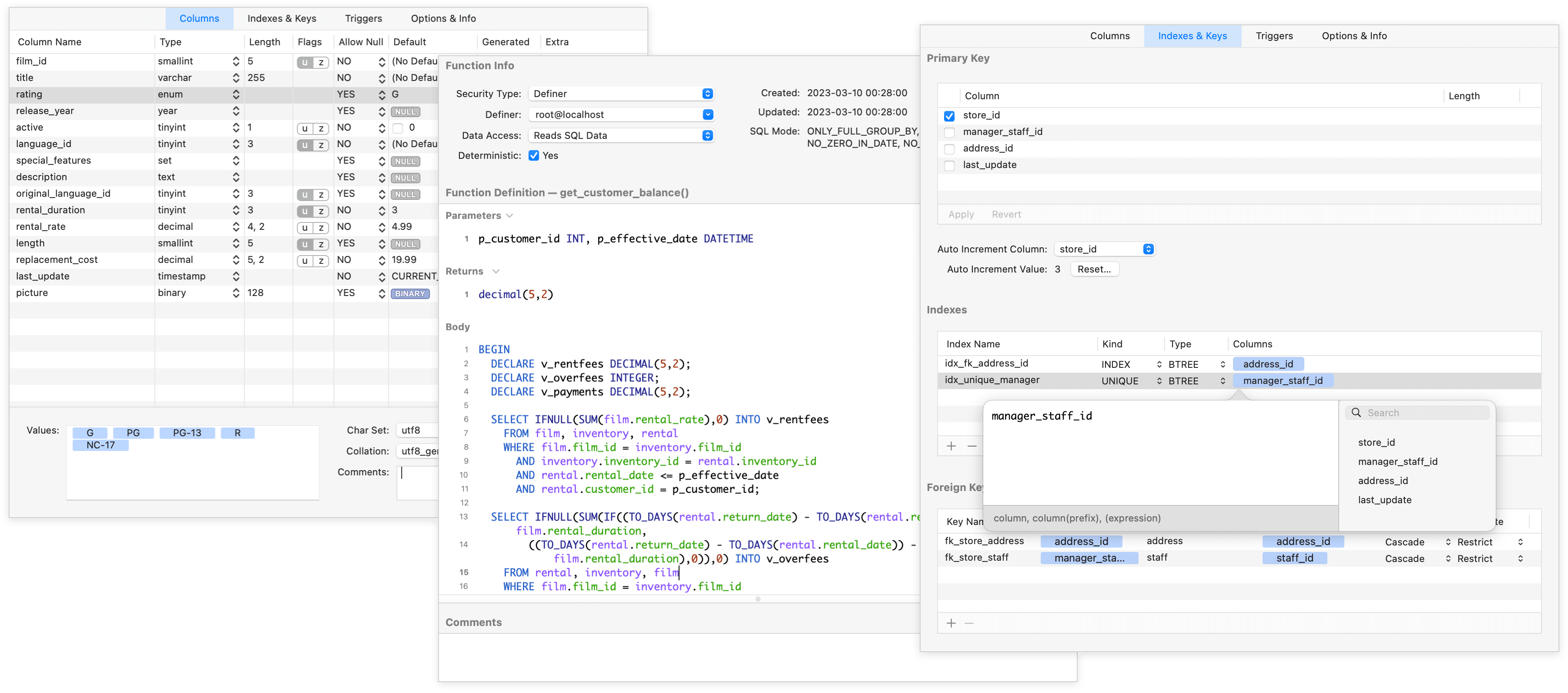
Straightforward and uncluttered editors allow you to quickly see and change the structure make-up of your databases without having to write queries.
Editors for ALL Types
Complete interfaces for defining and editing table columns, indexes, primary and foreign keys, triggers, events, functions, and procedures. Querious doesn't simply stop at table contents.
A MySQL Assistant
The various editors in Querious are a great way to expand your knowledge of MySQL by learning what's available and making it easy to use and change.
Call Functions & Procedures
Setup function and procedure parameters, and even easily call procedures without having to use a query.
Triggers
Set up SQL code to run either before or after any insert/update/delete occurs in a table.
Events
Events are SQL code scheduled to run at either a specific time or on a reoccurring interval.
Export Entire Server
Export anything from a single table to multiple databases at a time. You can even export the entire server's contents for a complete backup.
Export Presets
Exporting the same set of tables/databases/etc often? Save your export settings as a preset and easily reuse them over and over to save time.
Import Defaults
When importing CSV or Tab, specify default values to use for unmapped or empty columns.
Multiple Formats
Import or Export SQL, CSV, and Tab files, with fine-tuned adjustments to adapt to any slight format differences between programs.
Compressed Files
Big data? Small files. Querious can directly export to and import from compressed .gz files for maximum space savings.
Create Tables on Import
When importing a CSV or Tab file, you can create a new table directly from the imported data, specifying field names and types.
Not only can Querious do speedy imports and exports, but it can also "duplicate" views, triggers, functions, procedures, events, and even tables including their data content, within the same database, between databases on the same server, or between completely different servers! What's even more impressive is Querious can duplicate an entire database, even between servers.

We hate waiting, and we know you do too. That's why we obsessed over shaving off every last microsecond wherever we could.
For example, when it comes to importing and exporting data, nothing is faster than Querious. The only reason to use anything besides Querious is if you actually like waiting for super-long exports.
(With performance this good, it's hard not to brag.)
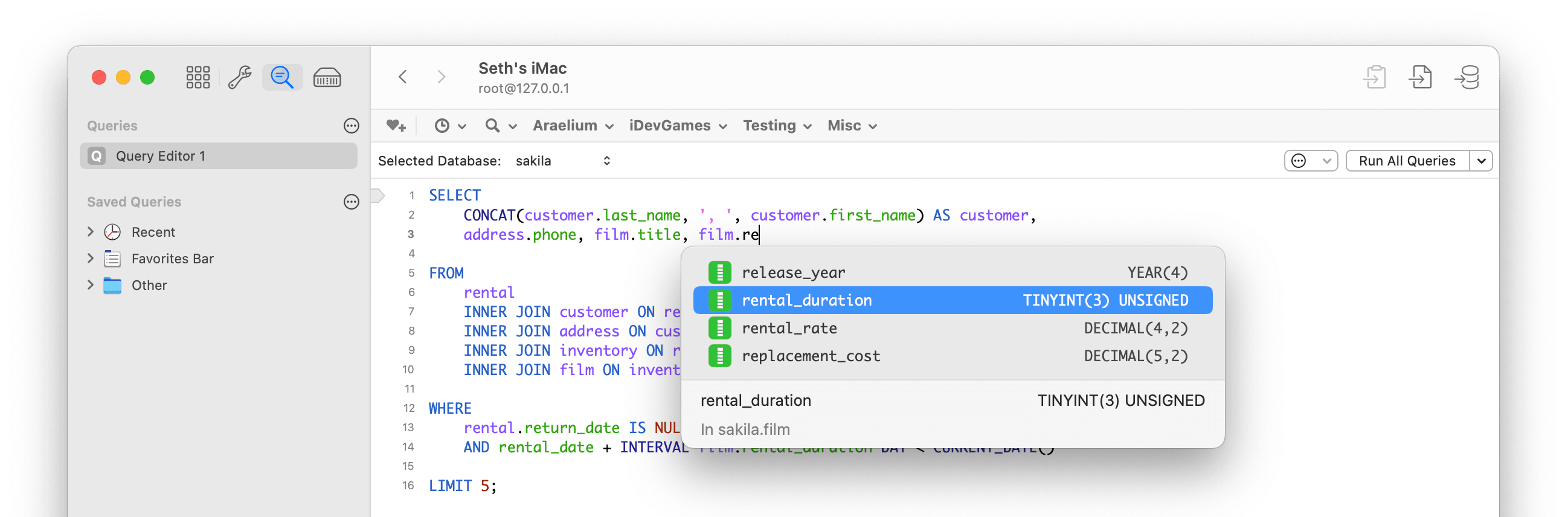
Advanced custom querying is richly supported when you need to perform custom joins, subselects, run alter statements manually, or any other kind of query. Context-sensitive autocomplete suggests just the right things at the right time, to make writing queries even faster.
Syntax Highlighting
Fast syntax highlighting of SQL keywords, values, and identifiers. Choose among multiple themes, with can even adapt to macOS Dark Mode.
Context-Sensitive Autocomplete
Autocomplete of MySQL keywords, database names, table/view/function/etc names, and even column names, with context-aware suggestions.
Multiple Code Editors
Open as many independent query tabs (code editors) as you want, each with independent results.
Organize Saved Queries
Convenient "Favorites" bar for often-used queries, and a highly organizable sidebar for big collections of queries.
Query Reformatting
Keep your code clean, with re-indented and case-corrected reformatting. You can even minify your SQL to embed in code.
Table Reference
Use the handy sidebar for referencing column names and types in tables.
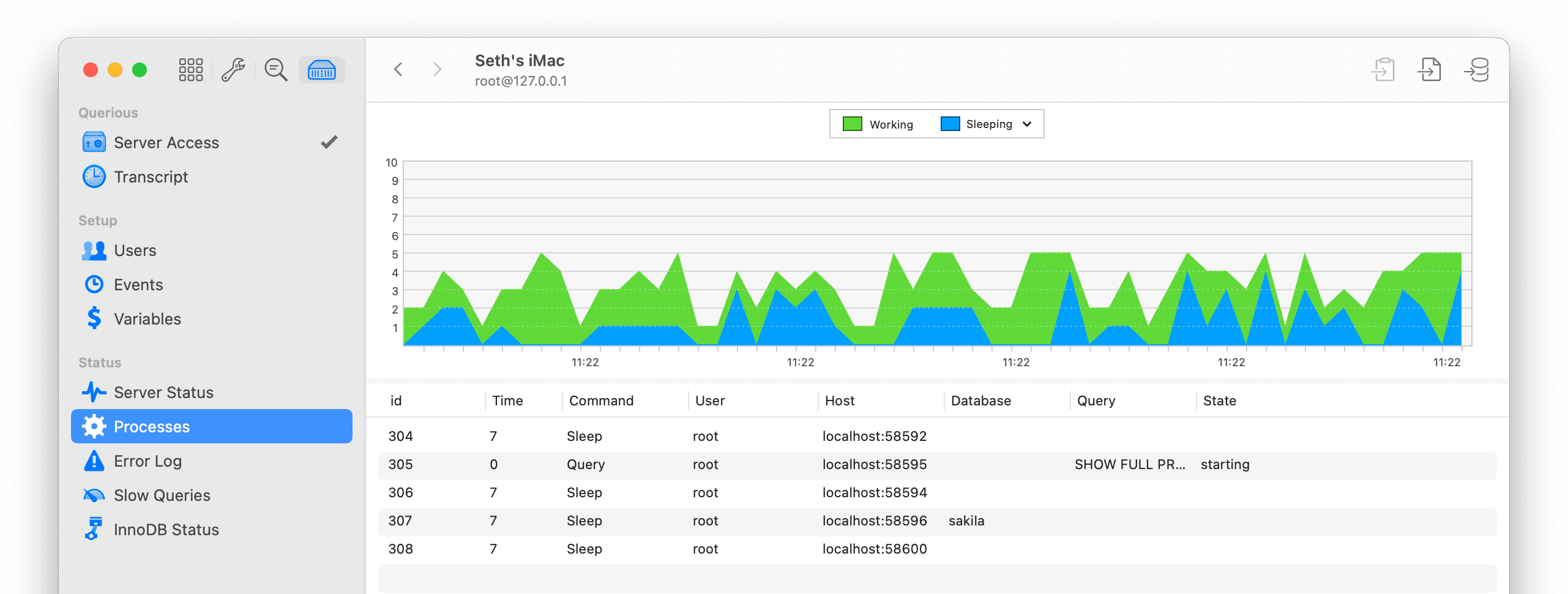
Querious goes beyond just helping you manage the data in your tables by enabling you to quickly see the status of the server, such as bandwidth used, number of connections, and see the queries/processes running on the server. You can also setup and administer user permissions, the event scheduler, server variables, and when file system access is authorized (via SSH for remote hosts), Querious can even display the errors and slow queries logged on the server.
 Query Transcript
See each query that Querious executes.
 Users
Users
Add or remove users, and change permissions.
 Server Status
Glance at a general overview of info.
 Processes
See how many and which queries are running on the server.
 Events
See a complete list of all scheduled SQL events.
 Server Variables
Inspect and change session- and server-level variables.
 Error Log
Access a log of any errors MySQL reports.
 Slow Query Log
Find out which queries are taking too long.
 InnoDB Status
Advanced users have quick access to engine status.

A full-featured super-easy-to-user Users view makes adding and removing users, and changing their global, database-level, or even field-level privileges a cinch.
Get a high level overview of how your tables are related to each other, and the keys which establish those relationships. See how tables connect to each other from foreign key to primary key.
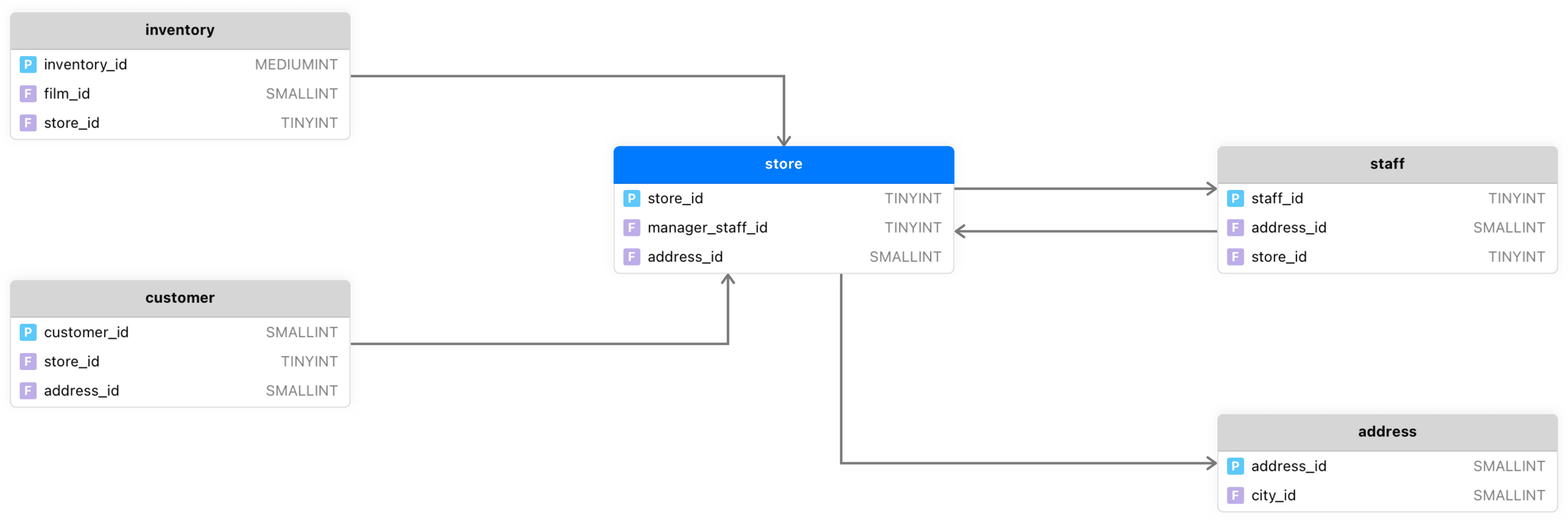
Artificial Keys
Only in Querious can you specify artificial keys which relate two tables, mimicking PK/FK relationships, without modifying the database.
Export as PDF
The Relationships graph view can even be exported as a PDF for you to include in documentation.
Zoom, Fields & Types
Zoom in and out, show and hide field names and types. You can even hide tables with no connections.
When working with evolving database structure, sometimes the development and production environments can drift apart. With database structure comparison in Querious, you can compare two databases, find all of the differences between them, and even adopt the changes needed to make them the same.

Step One — Setup
After selecting which databases on which servers to compare, choose which types of schema objects to compare, and which aspects to ignore.
Step Two — Review
Querious will compare the structure and show you the results. Select which differences to ignore.
Step Three — Update
Finally, the synchronization script will be shown and can be executed to make the chosen changes applied to the source database.
Querious has a powerful built-in editor for directly editing CSV and Tab files like a spreadsheet. If a client gives you a CSV file with wacky columns or malformed data, you can easily clean it up Querious.
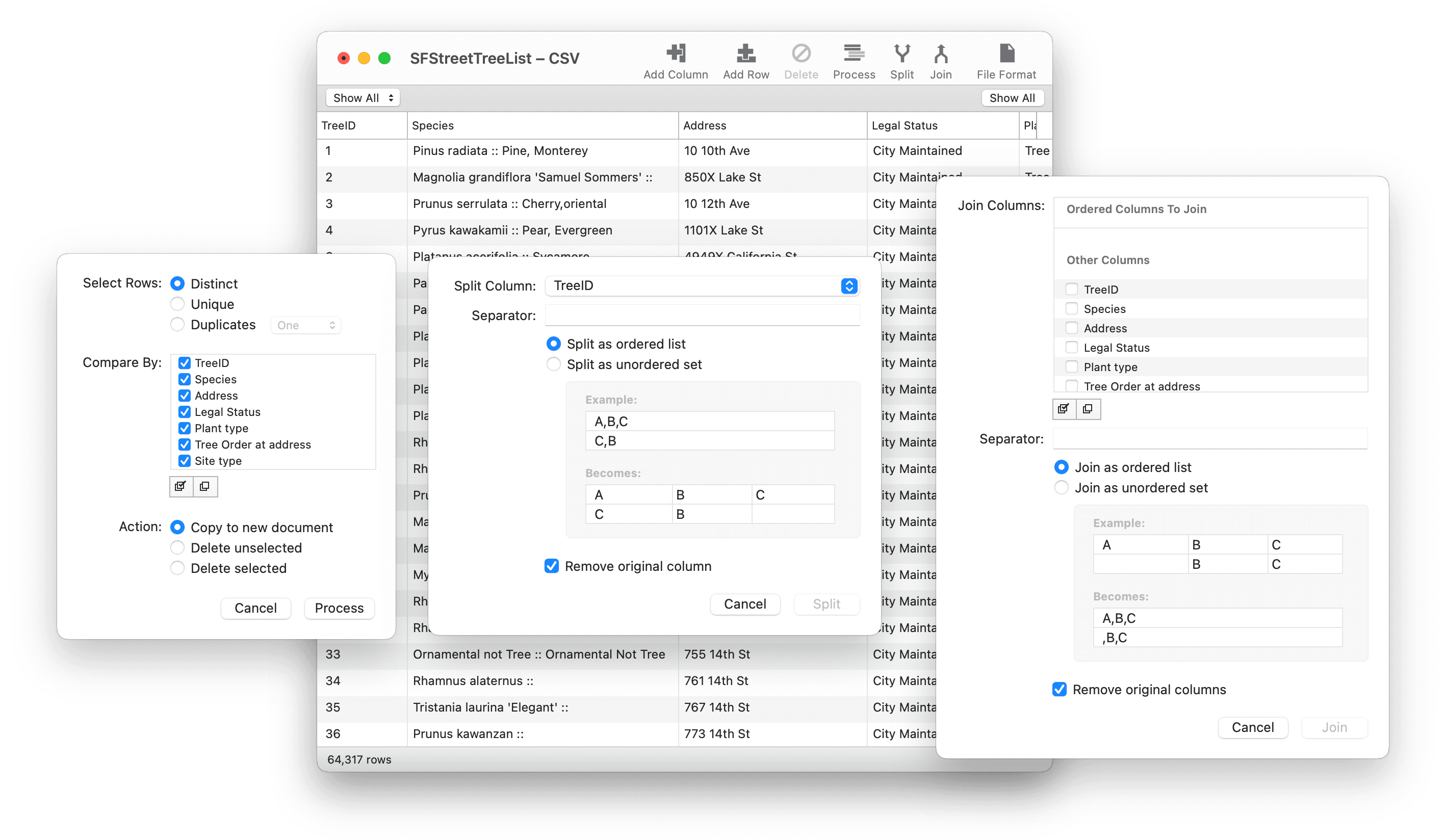
Need to apply a regular expression replacement to all or just one column? You can! Need to join multiple columns together? Not a problem! Need to split a single column into multiple columns? That's no problem either! Not only can you easily manipulate the add, filter, and massage the data in the files, but converting between CSV/Tab format varitions is a cinch.
 Process
Copy rows with unique values to a new document, or remove duplicates.
 Split
Split
Split a single column into multiple columns based on a given separator.
 Join
Join
Join multiple columns into a single column, with values separated by a separator.
